n8n Workflow Map & Execution Simulator
🏢 WORKFLOW VIEW: ABC_GmbH_Tenant_Cost_Notification
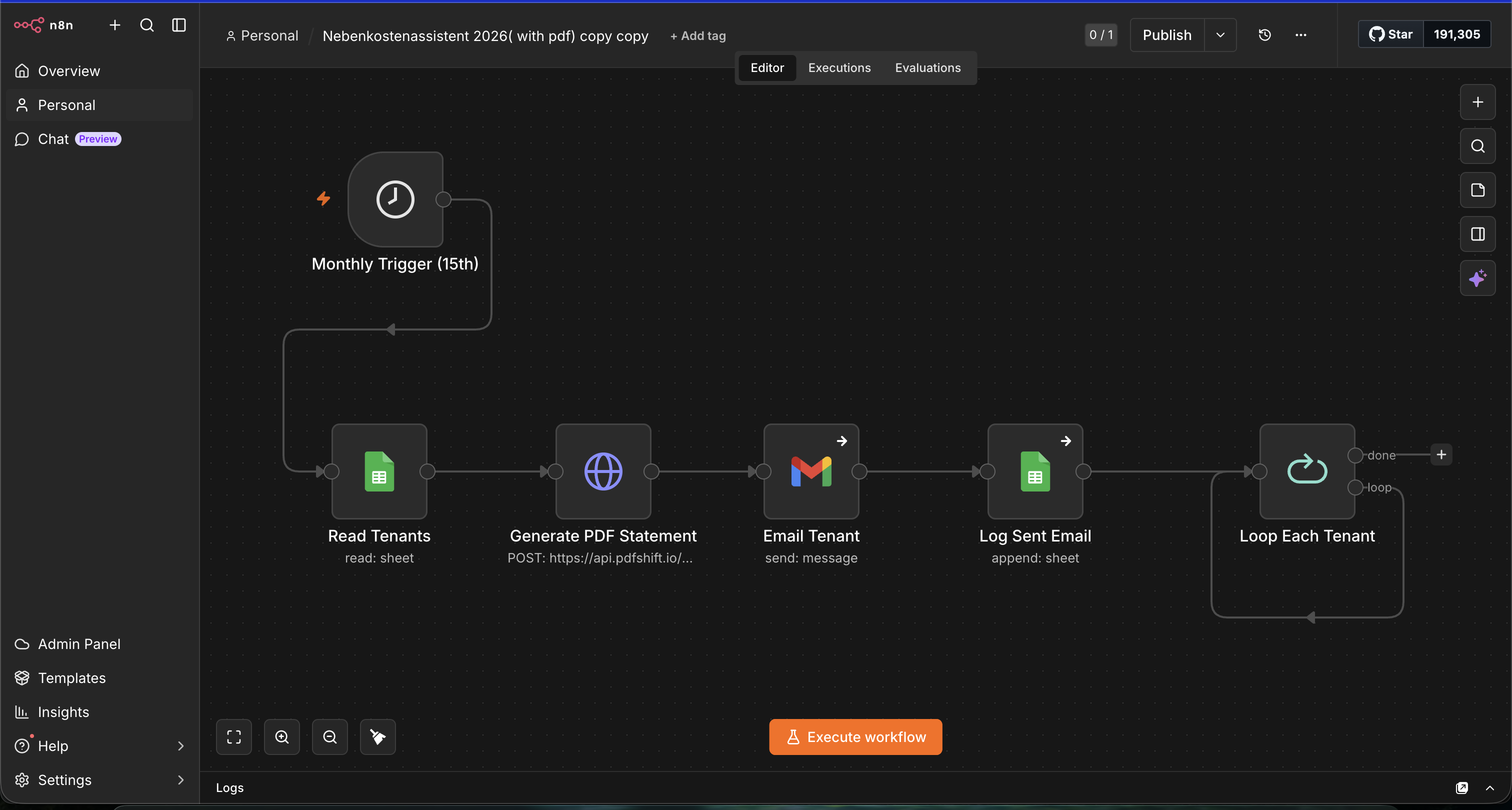
Click the image to open the full-resolution screenshot in a new window.
Managing monthly utility service charges (Betriebskostenabrechnung) for property portfolios is a major administrative burden. Managers manually aggregate invoices across 17 cost categories under § 2 BetrKV, split them proportionally per tenant based on floor area (qm) or resident headcounts (Personen), compile custom PDF statements, draft emails, and attach files—taking 4.5 hours per month with high human error risk.
Built a scheduled data-driven n8n workflow. The workflow fires on the 15th of every month, reads the clean tenant directory (File 2) from Google Sheets, loops through each tenant row, converts service charge HTML templates into professional branded PDFs using the **PDFShift API**, sends them via the **Gmail API**, and logs confirmation entries into a Sent Log sheet.
Delivered 144 tenant statement drafts across 12 units. Statement loop cycle time crashed by 99.9%. Clear separation between the detailed accounting workbook (File 1: the engine) and the clean automation sheet (File 2: the fuel) protects data sanity, while n8n's "On Error -> Continue" rule prevents bad emails from halting the entire billing batch.
Click the image to open the full-resolution screenshot in a new window.
This is the master German Betriebskostenabrechnung spreadsheet. Built for property managers, it manages building master data, all 17 operating-cost categories under §2 BetrKV, invoice records, and tenant calculations reconciled to the cent.
A machine-ready version designed specifically for n8n. Features clean headers in Row 1 with one row per tenant (names, emails, units, months, costs, totals, addresses) without merged cells or headings for flawless API parsing.
| Timestamp | Tenant Name | Unit | Month | Total Split Cost | Delivery Status |
|---|